


Skillsta: Social skill trainer
4.1159.00 Reviews
App Specs
- Version
- 1.9.0
- Updated On
- License
- Free
- Downloads
- 100,000+
- Developer
- Ranely Limited
- Categories
- Education
- Platform
- Android
Screenshots
 Analysis by AppCompare
Ever wondered how to nail that social interaction or ace an interview? Well, let me introduce you to Skillsta: Social skill trainer. This nifty little app is like having a personal coach in your pocket, ready to help you tackle social situations with confidence. Whether you’re prepping for a big presentation or just want to become a better conversationalist, Skillsta has got your back.
Why rehearsal can make a difference
Social confidence is difficult to build from advice alone. Knowing that it helps to listen carefully or ask a follow-up question is not the same as finding the words when a conversation is moving quickly. What appeals to me about Skillsta is the chance to work on social skills by responding to interactive situations, rather than only reading general tips. That shift from explanation to practice is the central reason I’d consider using it.
It is best to think of this kind of practice as a low-pressure rehearsal, not a substitute for real conversations. An exercise can give you a moment to pause, try a response, and consider feedback without worrying about holding up a colleague or making an awkward first impression. The useful transfer comes afterward: taking one idea from a session and trying it with a real person.
That distinction matters because social situations rarely have one perfect answer. A response that feels warm with a friend might be too casual in an interview, while a polished professional answer can sound stiff at a party. I would use the app to notice choices and build flexibility, not to memorize lines and deliver them unchanged.
What is Skillsta All About?
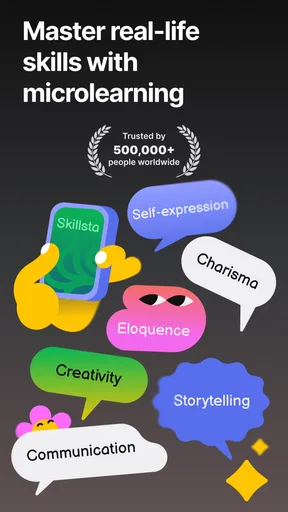
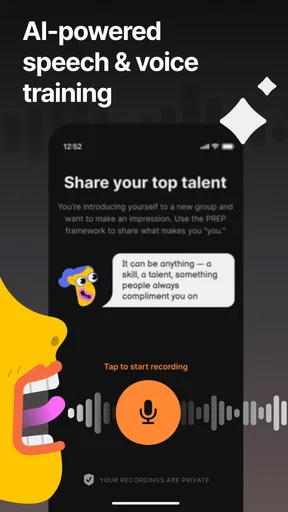
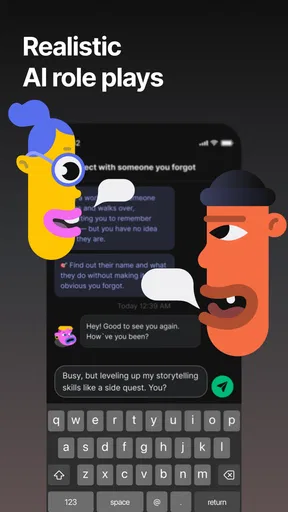
So, here’s the scoop. Skillsta: Social skill trainer is designed to boost your social skills through interactive challenges and personalized feedback. The app is packed with a variety of scenarios, from casual chats to professional meetings. You’ll find yourself immersed in realistic situations where you can practice and refine your skills.
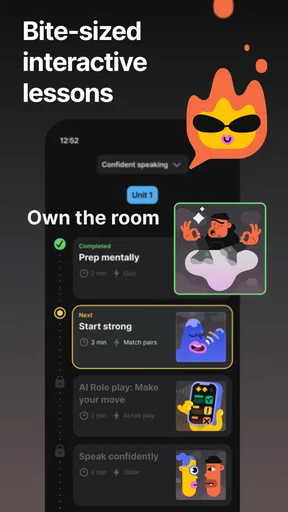
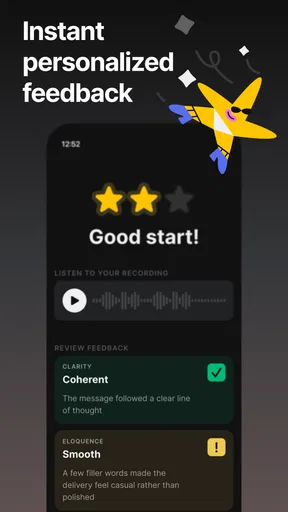
The app’s interface is pretty intuitive. You start by selecting the social skill you want to work on. From there, you’ll dive into a series of exercises that are both engaging and educational. The cool part? The app uses AI to provide real-time feedback, so you know exactly where you’re rocking it and where you might need a bit more practice.
Turning an exercise into useful practice
I’d approach a session with one small aim in mind: perhaps giving a clearer answer, making a conversation feel less one-sided, or sounding more composed when introducing myself. A narrow goal makes feedback easier to act on. If I try to improve everything at once, it becomes harder to tell what changed or what I should carry into the next conversation.
Worth Reading Before You Choose

EA SPORTS FC Mobile 26 Is a Bigger Football Game, but It Takes Time

Flipboard Shows What News Apps Must Do Beyond the Feed

Switching to Android Auto Means Rethinking Your Driving Routine

Google Calendar Makes a Crowded Week Easier to Manage

Ludo King Makes the Most of the Minutes Between Plans

Baby Panda World Brings Quick Play to Modern Phones, but Its Game Library Feels Busy
After receiving feedback, I would pick one suggestion and restate it in my own words. That is a practical way to avoid turning a helpful prompt into a script. For example, if an exercise points toward asking a more open question, I can remember the principle and choose a question that fits the person and setting in front of me. The app can help me rehearse; the judgment about what feels natural still belongs to me.
A simple routine can make the practice more concrete. Before a meeting, I might run through a relevant interaction, identify one habit I want to watch for, then reflect afterward on whether I used it. That keeps the tool connected to an actual goal instead of making practice an isolated activity. It also gives me a sensible stopping point: one focused rehearsal may be more useful than repeating exercises while tired or distracted.
Features That Stand Out
Alright, let’s get into some of the standout features that make Skillsta a must-try. First off, the app offers a wide range of scenarios. Whether you’re looking to improve your small talk, master public speaking, or become a whiz at interviews, there’s something here for everyone.
- Interactive Scenarios: Dive into realistic environments where you can practice your skills.
- Personalized Feedback: Get immediate insights on your performance and tips for improvement.
- Progress Tracking: Keep an eye on your development with detailed progress reports.
- Flexibility: It’s perfect for quick practice sessions or long deep-dives into specific skills.
One feature that really caught my attention is the app’s emphasis on personalization. As you progress, Skillsta adapts to your learning style and provides tailored exercises. It’s like having a personal coach who knows exactly what you need to work on.
A realistic moment to put it to work
Imagine that I have a job interview later in the week and tend to ramble when someone asks me to describe my experience. I could use an interview scenario to practice answering with a clearer beginning and a relevant example, then use the feedback to spot where my reply loses focus. Before the actual interview, I would keep the takeaway simple: answer the question first, then add the detail that supports it.
The value in that routine is not a promise that the interview will go perfectly. It is a way to make one familiar difficulty less intimidating by rehearsing it beforehand. The same approach could fit a presentation, a first meeting with a new team, or everyday small talk if starting conversations feels uncomfortable. In each case, I’d choose a scenario that resembles the situation, practice briefly, and adapt rather than copy the response in real life.
For a more ordinary use, a person could practice before a networking event or a group gathering where they expect to meet unfamiliar people. Instead of trying to become instantly outgoing, they might focus on opening a conversation and showing interest in the other person. That is a more realistic target, and it is easier to assess afterward than a vague goal like “be more confident.”
Where practice helps—and where it cannot
Interactive rehearsal is particularly useful when someone wants a safe place to try several ways of responding. It can reduce the blank-page feeling that appears before a difficult conversation, and personalized feedback can give a learner a specific point to revisit. For people who prefer doing an exercise over reading a chapter of advice, that format may be more engaging than a book or a list of communication rules.
It is not automatically better than every other way of learning. A book or thoughtful article can explain ideas at length and let you move at your own pace; a course may offer a more structured curriculum; and practice with a trusted person gives you a real human response. Skillsta’s interactive lessons sit in a useful middle ground: more active than passive reading, but not equivalent to dealing with another person’s unexpected reactions.
That is why I would combine it with real-world practice instead of treating it as the whole solution. A simulated conversation may help me prepare an opening, but it cannot guarantee that a colleague will respond as expected or that a sensitive exchange will follow a neat pattern. The strongest use is rehearsal followed by reflection: try a small technique outside the app, then notice whether it helped and what I would change next time.
The User Experience
Let’s talk about what it’s like to actually use the app. From the moment you open it, you’re greeted with a clean, user-friendly interface. Navigation is a breeze, and the app’s design is both sleek and modern. I found it easy to jump into a session and start practicing without any fuss.
The exercises themselves are engaging and, dare I say, fun! The interactive nature keeps you involved, and the real-time feedback is incredibly helpful. Plus, the app’s community feature allows you to connect with other users, share tips, and even practice together. It’s a nice touch that adds a social element to your learning journey.
Small choices that improve the experience
For me, the most useful way to approach progress tracking is as a record of practice, not a verdict on my personality. I would look for a recurring skill to work on and use the reports to decide what to revisit, rather than chasing a perfect result. Social ability changes with context, and a number or trend cannot capture every reason a conversation went well or felt difficult.
I’d also be selective about how much I take from any one feedback response. An AI-generated suggestion can be a helpful prompt, but it is still worth asking whether the advice fits the situation and sounds like something I would actually say. If a line feels unnatural, I would keep the underlying idea and rewrite the wording. That small adjustment can make practice feel more personal and less like performing a template.
The community element may suit learners who enjoy exchanging ideas or practicing alongside others, but it is not essential to the main appeal. Someone who prefers private practice can still focus on scenarios and feedback. Conversely, someone whose main goal is to build comfort with live, unpredictable conversation may want to make sure they also seek opportunities to interact offline; a social feature inside an app cannot reproduce every part of that experience.
Cost, access, and expectations
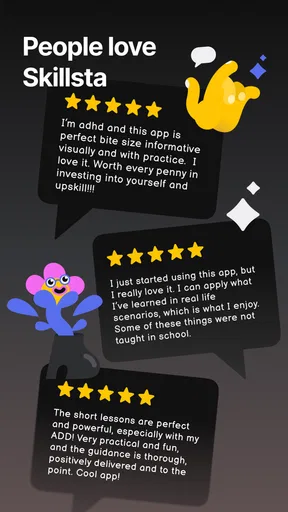
Skillsta is a free education app from Ranely Limited, and it is rated for Everyone. It has a 4.1 average from around 1,500 ratings, with more than 100,000 installs. Those figures suggest that people are finding and using it, but they do not tell me whether its style will suit a particular learner. I would treat the free entry point as a chance to see whether interactive practice works for me before deciding whether I want anything beyond it.
There are in-app purchases, with items priced from $7.99 to $139.99. That is a wide range, so I would check the purchase details carefully in the app and avoid assuming that every lesson or option is included at no cost. The right question is not simply whether a paid item exists, but whether it adds something I will use often enough to justify the expense. If I only need occasional interview rehearsal, I may have different needs from someone who plans to practice consistently across several kinds of situations.
The current version is 1.9.0, and the app requires Android 8.0 or later. Before installing, I would check that my device meets that requirement and consider whether I am comfortable using an app whose coaching includes AI-generated feedback. That is a practical expectation-setting step, not a reason to assume the feedback is right or wrong in every case. I would use it as guidance, apply common sense, and keep real conversations as the final test.
Who is likely to benefit most?
I think Skillsta makes the most sense for someone who wants structured, low-pressure practice and already has a specific situation in mind: an interview, a presentation, an unfamiliar group, or a conversation they have been putting off. It may also appeal to people who find general advice too abstract and learn better by trying a response, getting a suggestion, and trying again.
It is less suitable for anyone looking for guaranteed results, a replacement for professional support, or a complete course that can address every communication challenge. A learner who mainly needs detailed theory may prefer a book or a guided class. Someone who needs to work through a serious personal or mental-health concern should seek appropriate human support rather than expecting a social-skills app to resolve it. And if a person learns best through direct conversation, practicing with a trusted friend or mentor may be the better first step.
People who are already comfortable in everyday conversations may still find it useful when preparing for a particular high-stakes moment, but they may not need regular practice across broad topics. On the other hand, a nervous beginner can get value from starting small and repeating a manageable exercise. I would judge the fit by whether the scenarios match my needs and whether the feedback leads to one practical change I can use—not by how much time I spend inside the app.
Final Thoughts
In a world where social skills are more important than ever, Skillsta: Social skill trainer is a fantastic tool to have at your disposal. Whether you’re looking to polish your professional skills or simply want to become better at connecting with others, this app offers a comprehensive platform for growth.
The convenience of having such a powerful resource right on your phone means you can practice anytime, anywhere. And with its engaging exercises and personalized feedback, Skillsta makes the process not only effective but also enjoyable. So, if you’re ready to step up your social game, give Skillsta a try. You might just find yourself becoming the social butterfly you’ve always wanted to be!
Pros
- Interactive and engaging user interface.
- Personalized learning paths for users.
- Wide variety of social skill topics.
- Includes real-life scenario simulations.
- Progress tracking to monitor improvement.
Cons
- Limited offline functionality.
- Requires a subscription for full access.
- Occasional app performance lags.
- Limited language support options.
- Some features need internet connection.
FAQs for Skillsta: Social skill trainer
What is Skillsta: Social Skill Trainer?
Skillsta is an innovative app designed to help users improve their social skills through interactive exercises and feedback. It offers a variety of scenarios and challenges that mimic real-life social interactions, aiming to boost confidence and communication abilities. It's ideal for anyone looking to enhance their interpersonal skills.
Is Skillsta suitable for all age groups?
Skillsta is primarily designed for teenagers and adults who wish to improve their social skills. While it can be beneficial for younger users, parental guidance is recommended to ensure the content is appropriate. The app’s exercises are crafted to resonate with users who are in social or professional environments.
Does Skillsta require an internet connection to function?
Skillsta requires an internet connection for initial setup and downloading new content. However, many features can be accessed offline once the app is fully installed. This makes it convenient for users to practice their social skills anywhere, without needing a constant internet connection.
Are there in-app purchases in Skillsta?
Yes, Skillsta offers in-app purchases. While the app provides several free features, users have the option to purchase additional content or premium features. These purchases enhance the experience by offering advanced exercises, personalized feedback, and more comprehensive training modules.
How does Skillsta ensure user privacy and data security?
Skillsta is committed to user privacy and employs robust data security measures. The app uses encryption to protect personal information and does not share data with third parties without consent. Users also have the option to manage and delete their data within the app's settings.


